Introducing Hermes Enterprise on Microsoft Foundry: AI coworkers that are easy to use and easy to govern
Hermes Agent is getting a new capability powered by Microsoft Foundry: it can now work as an AI coworker with its own work account, managed like any other member of staff.
Hermes Enterprise is the most secure and governed way to bring the world's most popular open agent to work. That agent is Hermes Agent. It is currently the number one agent for both productivity and coding on OpenRouter, processing close to two trillion tokens a day. It makes Hermes an excellent agent for knowledge work. Given that popularity, there has been huge demand to bring it to work, so we partnered with Microsoft on a simpler mental model that makes bringing agents to work easy.
Every company wants autonomous AI agents until the security team asks a simple question: whose credentials is that agent using?
Right now, almost every enterprise agent works by impersonating a human. You click an OAuth consent screen or wire up an MCP server, and the agent borrows your identity. As long as your browser tab stays open, it reads your inbox, edits your files, and acts under your name.
Borrowing a login is fine for a personal helper that drafts something when you ask. But once an agent works for a whole team or company, it causes four problems.
IT has to build a second control system. The agent holds part of a person's access. So the company needs new tools to manage it: consent screens, a safe place to store login tokens, rules for what each agent may touch, and a way to take it all back. The company already has all of this for people. Now it has to build it again for agents.
Employees have to learn something new. A screen that says “Allow this app to read your mail and files” makes sense to IT staff. Most employees have never used an AI agent. They can't tell what they just allowed, or what the agent can now see. So they hold back.
It isn't safe by default. The agent can do anything its user can do, and everything it does is logged under the user's name. To work in the background, it needs a saved copy of the user's login token. In a team chat, it has to pick one person's access for everyone. If it acts as Anna, Ben may see files he isn't allowed to open, and the log will say Anna shared them.
It runs unattended. Scheduled work is one of the most useful things an agent can do, such as “every Friday at 5 p.m., send the team the status report.” But on your account, that means leaving software alone with full access to your email, files and chats, week after week, with no one checking what it does.
That is why we are adding a new capability to Hermes, our open-source agent, and the idea behind it is simple: each agent gets its own work account, complete with email, a cloud drive, a calendar, a chat profile and a manager, and joins the company much as a new hire would. IT governs it with the tools it already uses for staff. Employees work with it as they would with any colleague, by sending it a message or sharing a folder with it. With nothing new to build and nothing new to learn, adoption stops being the hard part.
The future of work agents: coworkers, not software
Companies already know how to manage people. When someone joins, IT creates their account and gives them access to what the job needs. When they leave, IT switches it off. Employees know how to work with a new colleague too. You send them a message. You share a folder. You take the folder back.
An agent with its own account fits into all of this as it is:
| For a new employee | For an agent with its own account |
|---|---|
| IT creates an account with email, a drive and a manager | Same: email, a cloud drive, a calendar, a chat profile, a manager and a place in the org chart |
| Colleagues share the folders and channels the job needs | Same: you share a folder with the agent, and you can unshare it |
| Security policies and audit logs apply | The same sign-in rules, data protection and threat detection apply, and the log shows the agent's name |
| IT disables the account when the person leaves | IT disables the agent's account, or switches off the whole agent type and every copy stops |
None of this is new. IT uses the policies it already has. Employees use habits they already have. Want the agent to see the budget? Share the budget folder with it. That is why there is so little friction.
The four problems go away too. The agent never holds anyone's login. The Friday report goes out from the agent's own email. In a team chat, the agent uses its own access, which everyone can see. And the log names the agent, not Anna. So what lets a company trust an agent with real work isn't a longer feature list. Features such as memory and planning change with every release. Trust comes from something simpler: its own account, its own access, and a manager who answers for it.
We believe this model makes AI agents at work far simpler, and the difference is easiest to see side by side:
| Impersonator: AI software that uses your login | Coworker: AI with its own work account | |
|---|---|---|
| How employees work with it | Learn new software: connect it to your accounts, approve consent screens and work out what it can now reach | Treat it like a new colleague: send it a message, forward an email or share a folder |
| How IT governs it | Build new controls just for AI: app reviews, consent rules, checks on how vendors store login tokens, and new monitoring | Govern it like a new hire, with the identity, policy and audit tools already used for staff |
| Getting started | Install an app, sign in with your work account and approve a consent screen asking to “read and write all your mail and files” | Just tag it in Teams and say hello |
| What it can reach | Everything you can: your whole mailbox, drive and calendar | Only what people share with it |
| Who it acts as | You, with all of your access | Itself, with only the access it has been given |
| Attribution: who did what | Emails it sends and files it changes are recorded under your name, so telling your work from the agent's takes extra digging | Its actions are recorded under its own name, so anyone can see what the agent did and what people did |
| In a team chat | It has to use one person's access for everyone, so others may see files they shouldn't | It uses its own access, the same for everyone |
| Work while you're away | It keeps your access and uses it with nobody watching | It runs scheduled work as itself, and no one's login is stored |
| Taking access back | Find the app in your security settings, revoke its access and check nothing it scheduled still runs | Unshare the folder, as you would with anyone |
| Retiring it | Work out which employees connected it, remove its access and hunt for automations still running under their names | Switch off its account, as you would for a leaver |
Microsoft Foundry runs the agent for you
Giving an agent that kind of standing takes two things: a platform that runs thousands of agents safely, and a way to give each agent an account the company can govern. Building both from scratch would be a huge project. Luckily, we didn't have to, because Microsoft has already built both. Microsoft Foundry runs the agents, and Foundry's autonomous agents give each one its own work account.
Microsoft Foundry is Microsoft's platform for building and running AI agents. Its hosted agents take your own code: you package the agent as a container, and Foundry runs it inside your company's Azure subscription.
A sealed-off sandbox for each conversation. Each session runs in its own isolated virtual machine, so one conversation can't see another's files. Its files are kept between messages and restored when the session wakes up.
You pay only while it works. Foundry automatically shuts the agent down when it isn't working on anything, and saves its files for next time.
Tools built in. Foundry comes with ready-made tools the agent can call, such as web search, a hosted browser and a Code Interpreter that runs code in its own sandbox. Hermes uses them alongside its own Microsoft 365 tools for email, calendar, OneDrive and SharePoint.
Less to build. Hermes runs from its standard image, with one small patch. Foundry provides the rest: the endpoint, the agent's identity, the bridge to Teams and Outlook, scheduled tasks, AI models from your own Foundry project, and logs in Application Insights.
So Foundry takes care of running the agent. What it doesn't do on its own is make the agent a member of your company. For that, Foundry has autonomous agents.
Autonomous agents give the agent its own work account
An autonomous agent is a Foundry hosted agent that works as a named member of the company, under its own identity. Any Foundry agent, autonomous or not, gets a technical identity that the software uses to sign in. What makes an autonomous agent different is a second identity: a user account in Microsoft Entra, the directory that holds every employee, which comes with an email address, a OneDrive, a calendar, a Teams profile, a manager and a place in the org chart. In Microsoft's words, capabilities describe an agent, but identity establishes it.
IT governs autonomous agents from the Microsoft 365 admin center, where it already manages staff. There, Microsoft Agent 365 lets IT approve each autonomous agent, apply policy to it and review what it does.
You don't set up these agents one by one. You publish one blueprint, and employees create instances from it:
| What it is | Example | |
|---|---|---|
| Blueprint | The agent's code, its tools and the permissions it asks for. It gives no access to anyone's data. | “Hermes Agent on Foundry”, published once by IT |
| Instance | One created copy, with its own account, manager and access | “Anna's Hermes”, “the finance team's Hermes” |
A tool is not the same as access. Every Hermes instance knows how to read email and edit documents. But it reads only its own inbox, and it edits only what people share with it. IT sets the rules once, on the blueprint, and they apply to every instance.
This is how an agent goes from code to coworker:
- Publish. A developer publishes the agent's blueprint. A request appears in the Microsoft 365 admin center.
- Approve. An administrator picks who may create it, chooses a policy and approves the permissions it asks for.
- Create. An employee opens Teams and goes to Apps → Agents for your team. They name their new agent and create it. A few minutes later, it says hello in a Microsoft Teams chat.
- Work. People chat with it, email it, share files with it and add it to group chats.
For employees. They create their own agent in Teams, with no ticket to file, and work with it as they would with any colleague: they chat with it, email it and share files with it.
For IT and security. They approve one blueprint and set one policy, and every created copy inherits both. The agent signs in under the same company rules as staff, and the audit log shows its own name. Block the blueprint and every copy stops.
Preview. Autonomous agents are still in preview, available only for companies opted into Microsoft Frontier program.
Inside Hermes Agent on Foundry: from a Teams message to finished work
That covers the platform. Now for Hermes itself. Usually Hermes runs on a server or a laptop and talks to people through Telegram, Slack, Discord and other apps. On Foundry, it runs in a single container alongside three small helpers that connect it to Microsoft 365:
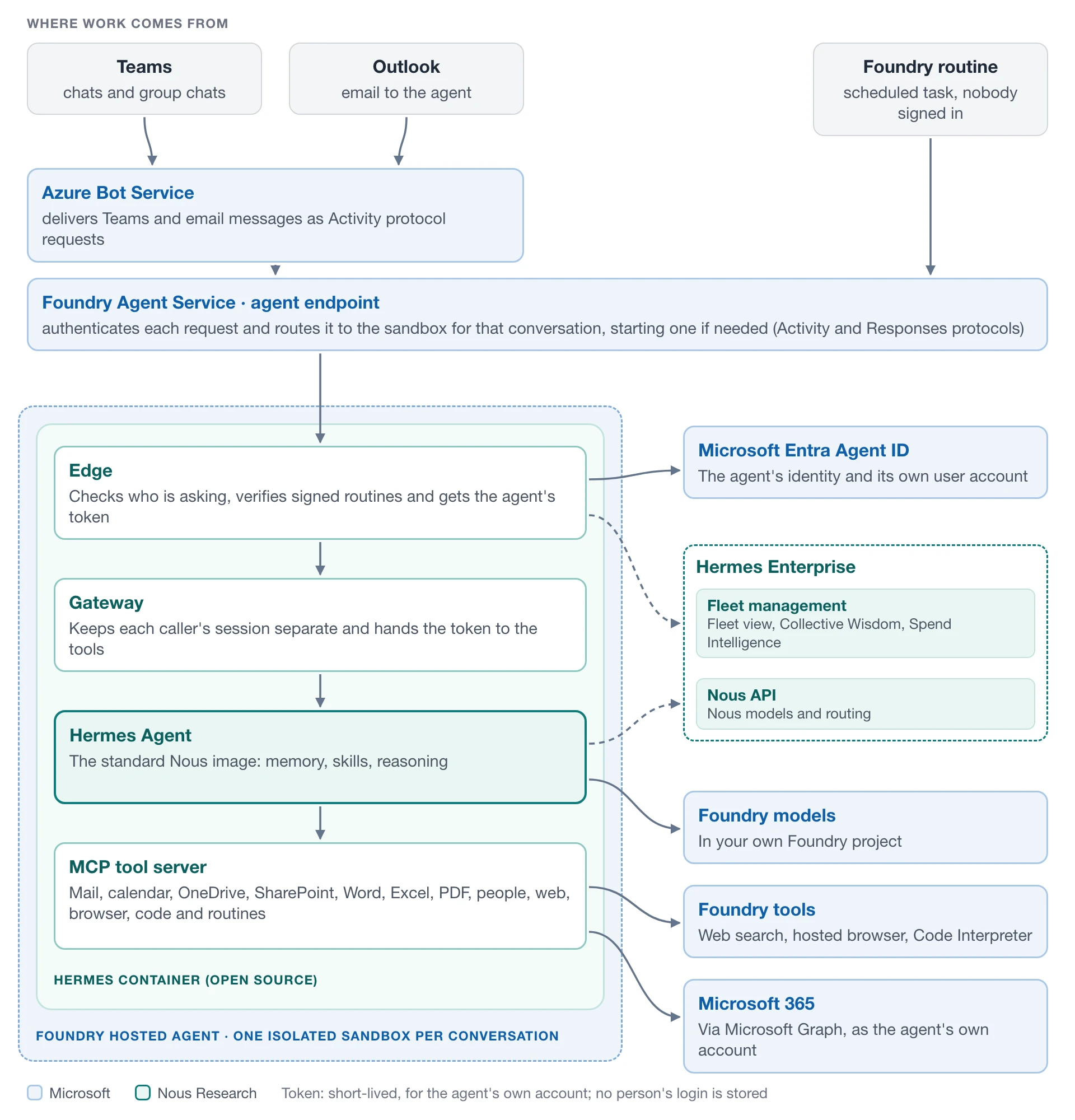
Hermes never keeps a long-term password or token. For each message, the edge gets a fresh token that expires quickly. Every action in Microsoft 365 runs as the agent's own account. The recipes below show how.
Recipe 1: reply in Teams as itself
An employee messages their agent in Teams. Teams sends the agent's details along with the message. The edge trades those details for a token for the agent's own account, using the Microsoft 365 Agents SDK.
Now ask: “What's your email address?” Hermes gives its own. Ask: “Put the draft in a shared folder and send Anna the link.” Hermes saves the file in its own OneDrive and shares it from its own account.
Recipe 2: read and answer its own email
Email to the agent reaches the edge the same way a Teams message does. Hermes reads it and replies from its own address. Two things matter:
- Set the agent's endpoint to BotServiceTenant. Microsoft's sample uses BotServiceRbac instead, and with that setting email never reaches the agent. No error tells you why.
- Treat every email as untrusted. The edge looks up the sender and applies the same rules as in Teams. It also keeps a list of handled emails in the agent's OneDrive, so if the same email arrives twice, Hermes answers once.
Recipe 3: do scheduled work when nobody is there
Say you ask: “Every weekday at 8:30, summarise my unread email.” There is no chat message, and no one is signed in. So Hermes calls its create_routine tool, and the edge sets up a Foundry routine that wakes the agent on schedule. (Hermes' own scheduler is switched off.)
When the routine runs, the edge needs a token. It gets one through Microsoft Identity Web's agent user flow (WithAgentUserIdentity). The blueprint signs in as itself and picks this agent's account. No person's login is stored anywhere.
Each routine also carries a signed note: who owns it, which agent it belongs to and what task it runs. If someone forges or changes the note, the edge rejects the request before Hermes sees it. And one agent can't see or delete another agent's routines.
Recipe 4: remember things across sessions
When a conversation goes quiet, Foundry saves its files, and Hermes keeps its memory there. But a conversation can still end: when you ship a new version, after 30 days without use, or when the same person writes from another app.
So Hermes also backs up its memories and skills to a folder in its own OneDrive, and each new conversation restores them. Only the owner's conversations can change that backup. Passwords, tokens and chat histories are never backed up.
Recipe 5: work with colleagues, with the owner's OK
A coworker gets requests from many people. So each agent follows clear rules about whom it listens to:
| Who is asking | What Hermes does |
|---|---|
| Its owner (its manager) | Uses all its tools, plus its own files, email and calendar |
| A colleague at the same company | Answers questions and helps. Touches the agent's files, email or calendar only if the owner allowed it |
| Anyone outside the company | Gets no reply |
Owners give access in plain words: “Let Alex read the files in the Invoices folder.” Hermes then shows the owner exactly what will change: who gets access, to what, and until when. Nothing happens until the owner replies “Yes”.
Every tool call checks these rules, outside the AI model. So a clever prompt can't talk its way past them.
Run Hermes in your own Microsoft 365 tenant
The code behind this article is open source. It isn't a finished product yet, but you can already try it in your own tenant. There are two places to start:
The code. The hermes-foundry repository on GitHub: github.com/NousResearch/hermes-foundry
The cookbook. Step-by-step instructions, with what you should see at every step: Cookbook: run Hermes Agent as a Microsoft Foundry autonomous agent
In short, getting your first Hermes takes four steps:
1. Check what you need. An Azure subscription, and a Microsoft 365 tenant that has joined Microsoft's Frontier program for autonomous agents.
2. Deploy. Run the installer from the repository. It builds Hermes in your own Azure subscription and submits it to your administrator. If your organisation adds agents by uploading a package, the repository also builds that upload file for you.
3. Approve. An administrator approves Hermes in the Microsoft 365 admin center and chooses who can create it.
4. Create. In Teams, go to Apps → Agents for your team, create your Hermes and say hello.
Running Hermes across a company with Hermes Enterprise
While work on Hermes on Foundry continues, companies are already running Hermes Enterprise, and that is where Foundry-hosted agents will be managed when they launch. For now, Hermes Enterprise is the quickest way to put Hermes to work across a company.
One agent is easy to manage. Hundreds are not. Once every team has its own Hermes, someone needs to know which agents exist and who owns each one, to govern them, and to see whether each one is healthy. Hermes Enterprise answers those questions in one place, so IT sees the whole fleet instead of chasing it team by team.
The most interesting part is what happens to what the agents learn. Hermes teaches itself new skills as it works. With Hermes Enterprise's Collective Wisdom library, a skill one person's agent has picked up can be published once and spread automatically to other agents, so everyone in the company levels up.
Then there is the cost. Hermes Enterprise's Spend Intelligence builds on something few AI platforms offer: you keep your traces and can analyse them. That shows where the money goes and what return it brings, so you can save frontier models for the work that needs them and use more cost-effective models everywhere else. Because Hermes is vendor-agnostic, you are free to choose any of the models available in the Foundry catalog. The conversation moves from model routing to return on investment.
If you want to see how this would work for your teams, start at the Hermes Enterprise website.
Further reading
- Overview: autonomous agents in Microsoft Foundry (Microsoft Learn)
- Quickstart: build your first autonomous agent (Microsoft Learn)
- Hosted agents in Foundry Agent Service. learn.microsoft.com/azure/foundry/agents/concepts/hosted-agents
- Hermes Agent. github.com/NousResearch/hermes-agent